Documentation as Code
Docs-as-Code does not mean that code replaces documentation. Why would it? It would have to be called Code-as-Doc.
It means treating documentation with the same principles as software: structured, versioned, automated and close to the code.
This article explains why classic documentation so often fails, and how a Docs-as-Code approach can help keep it current and usable over time.
Two myths about documentation
My code is the documentation
Do you know this claim?
I know it very well and like to use it myself. But it only holds under the following conditions:
-
The code is written according to clean code principles, and thanks to clear, unambiguous naming of functions, variables and interfaces, to the Single Responsibility Principle and to other best practices, you really can tell from the code itself what it does and why
-
The system is simple enough that no additional architecture documentation is needed (usually a false assumption!)
-
The code is accessible to all stakeholders, and all stakeholders can read code
-
…
Fundamentally the claim is simply wrong, because the code can be no more than one part of a software system’s documentation. If it really is written cleanly, though, it can certainly be part of it.
If you want to build software seriously and professionally, there is no way around documentation alongside the code.
Documentation is out of date the moment it is written
Yes, that is true - if it is done wrongly.
Three central questions about documentation
First you have to ask WHAT should be documented, second HOW, and third WHY you want to document at all.
Depending on the environment, the requirements can differ considerably. Public sector projects often demand extensive documentation that you simply cannot avoid. Quite simply, because that is how it is. Systems where human lives may be at stake will certainly require different documentation from an administrative application.
Either way: as soon as you have to build a system made of several building blocks, you will think about its architecture - and that belongs in documentation. And if you do it properly, architecture always comes into being before the code.
These days, and thankfully, architecture does not emerge upfront. Good architecture is evolutionary and grows with the requirements. Even so, a design always precedes the code, and there are always reasons why code is written (business requirements, quality requirements, and so on). All of that belongs in documentation.
So from the perspective of a software developer and/or software architect, the WHAT is answered at the very least by documenting the architecture. What that documentation should look like is individual and can differ from project to project. Out of convenience I stick to proven best practices developed by experts, which is why I follow the arc42 structure for architecture documentation. But that is not what this article is about.
So let us turn to WHY I should document anything if the code is the real truth anyway.
My immediate answer would be: not every stakeholder can or wants to read code. Project managers (where they exist), or product owners, may well have access to the code, but they have a very different view of the software they are responsible for.
Documentation therefore has to satisfy more abstract, or simply different, perspectives. Architecture documentation focuses on why the software should be written the way it - hopefully - was written (making sure of that is a different discipline within the software development process). It documents various requirements and connects them to strategies and decisions that should ultimately be reflected in the code.
But HOW should you document so that the team actually maintains it and keeps it current?
Well, my experience says there should be as few medium switches as possible, so that developers document too - ideally even willingly. Which means: the closer to the code, the better.
I therefore try to write all documentation in ASCII format (as the code is) and to store it as close to the code as possible. Where it is possible and sensible, even in the same source repository.
If I do not have to go looking for where the documentation lives, but get it together with my code, everything is in one place and I can switch between documenting and coding without a break in media.
It also makes it more likely that code and documentation do not drift too far apart. The development process can ensure this more easily as well, because it only has to deal with a single medium.
Is that already Docs-as-Code?
NO.
What does Docs-as-Code really mean?
Neither the storage location nor the medium is what decides whether something is Docs-as-Code - even though some media are certainly better suited to really living Docs-as-Code than others.
But I can live Docs-as-Code in a Git repository just as well as in Confluence or a similar platform.
Docs-as-Code means, to me, that I do not merely write text and insert pictures, but that I maintain the documentation exactly the way I maintain my code.
That is, I try to keep a recognisable structure. I try to honour the Single Responsibility Principle in documentation too. And I try to avoid duplication and to write nothing that is not needed (YAGNI).
One further, very important aspect also helps me decide which medium to use (sadly this is not possible in many client projects, even though I do try to influence it): write once, deliver anywhere. In the context of documentation this is, in my view, often underestimated - but it becomes absolutely essential at the latest when I have to deliver my documentation, or make it available to different stakeholders from different departments or even different companies.
So it has to be possible for me to write my documentation once and then present it as a website or send it as a PDF, for example. And the quality should not really differ between the two (the browser’s print function will not normally produce a satisfying result).
On top of that come the different views. I have to be able to prepare my documentation so that, depending on the requirement, it also leaves things out. For instance, you may not want department names to appear in the PDF you send to an external service provider - but you very much do want them in the internal company wiki where the documentation lives. Perhaps even with a direct link into the department intranet, which you would have no access to from outside.
So a number of different forces act on documentation:
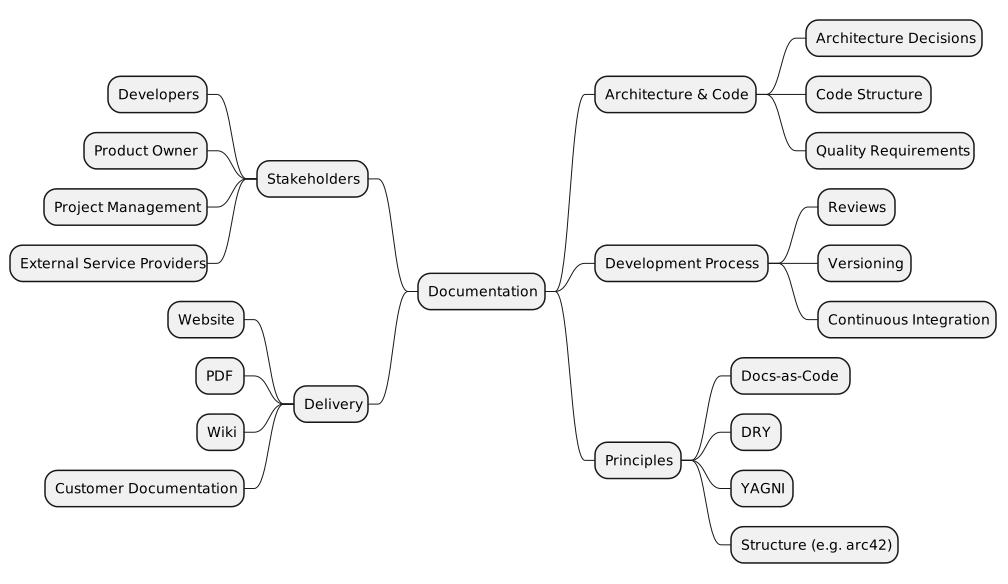
Documentation does not come into being in a vacuum. It is shaped by technical, organisational and process-related factors.
Docs-as-Code therefore does not only mean picking a particular tool or format, but deliberately translating those forces into structured, maintainable documentation.
To achieve all of that, real code has to be written in the documentation around the actual documentation. Usually these are macros interpreted while the output format is generated. But pre-processors may be needed as well, which may first have to scan the documentation in order to generate additional artifacts.
So anyone who takes documentation seriously, and holds their software (and therefore their documentation) to a certain standard of quality, will not get around thinking about it at the level of a software developer.
This very site can serve as a direct example. It really only presents static content (much like documentation). But it represents me in different views. It also contains my CV (de), for instance. Besides the fact that the CV holds information that can also be found on the website, I want to present the CV both as a website and as a directly downloadable PDF. The CV downloaded straight from the website should not, however, contain personal data such as an address or a telephone number. For that case I want to be able to generate a different PDF on demand - from the same content, but with additional material.
This site is written in ASCIIDOC. Accordingly, there are macros that help me decide which content is shown when, and how.
ifeval::["{backend}" == "pdf"]
=== Skills

include::{includesdir}/skills/skills_matrix.adoc[]
\
'''
endif::[]
Here my skills matrix (de) should only be embedded when the output format is PDF.
Elsewhere the matrix is only embedded when the output format is HTML:
ifeval::["{backend}" == "html5"]
include::{includesdir}/skills/skills_matrix.adoc[]
endif::[]
You can see it: different places (views), same document being embedded.
And since I can present the matrix a little more fancily on the website than in the PDF, I decide once more within the document itself which form should be embedded.
ifeval::["{backend}" == "html5"]
include::./skills_matrix_site.adoc[]
endif::[]

ifeval::["{backend}" == "pdf"]
include::./skills_matrix_pdf.adoc[]
endif::[]
So: different audience, different presentation.
What does a typical Docs-as-Code pipeline look like?
The pipeline for documentation can of course differ in its details. That depends heavily on the environment. The following picture shows, as an example, the pipeline for this website:
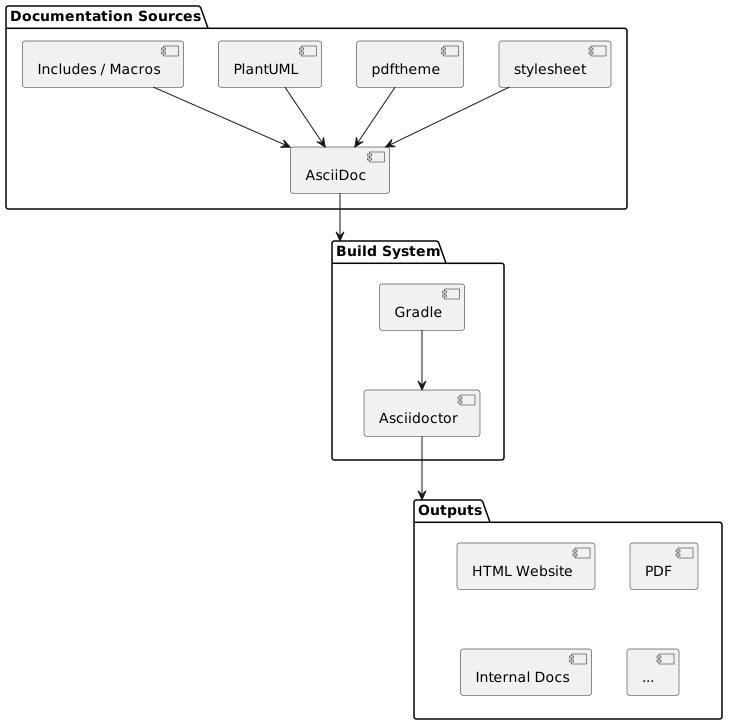
The build system is visible as the central component. This website is built with Gradle and asciidoctor. That can of course vary. There could be other frameworks around or in front of asciidoctor, such as the docToolchain. The idea, however, is always the same:
-
Write the documentation as code
-
Use interpreters of your documentation to
-
generate different output formats of that documentation
Key takeaways
-
Code alone is not documentation. Good software also needs context, decisions and architecture.
-
Documentation only works without a break in media. The closer it sits to the code and to the development process, the more likely it stays current.
-
Docs-as-Code is not a tool - it is a way of working. Documentation is structured, versioned, automated and maintained like code.
-
Automation makes documentation sustainable. A build pipeline makes it possible to generate different output formats from the same sources.
Conclusion
Documentation rarely fails because people do not want to document. It usually fails because the process does not fit the way they work day to day.
The Docs-as-Code approach tries to solve exactly that problem: documentation is written where the code comes into being, with the same tools, the same principles and the same automation.
That way documentation does not become an annoying extra task - it becomes a natural part of software development.
Documentation is not a by-product of software development - it is part of it.
The code shows what a system does. Documentation explains why.
These thoughts led me to put together a toolkit that gives me the tools to live my documentation philosophy simply and consistently when writing my own documentation.
You can find that toolkit at https://github.com/docs-as-code-toolkit as an open source project.
Comments
Questions, additions and feedback are welcome and are recorded as a public GitHub issue.
Comment on this article